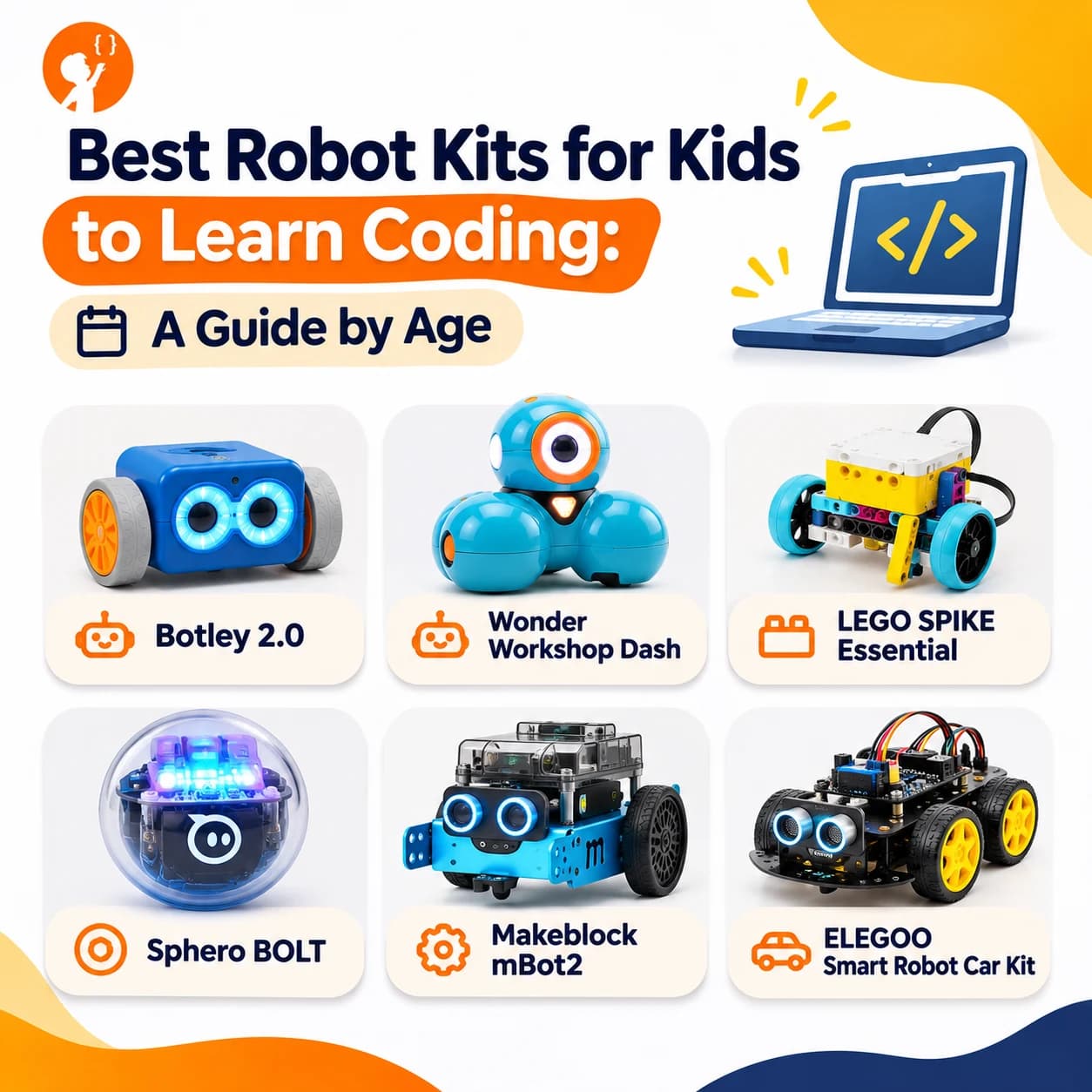
Searching for the best robot kits for kids to learn coding? A good kit makes coding feel real, because a child writes a few lines and something moves. The wrong kit ends up in a drawer after two days.
This guide compares six popular options by age and experience, explains what to check before you buy, and helps you decide whether your child needs a kit at all.
What Is a Coding Robot?
A coding robot is a small machine that children program to move, make sounds, light up or react to the world around it. Some are ready to use straight from the box, while others are built from parts first. Either way, the child gives instructions, watches what happens and fixes mistakes, which is exactly how real programmers work.
| Quick Facts | Details |
|---|---|
| Starting age | Around 5, with screen-free robots |
| First coding style | Buttons or drag-and-drop blocks |
| Next step | Typed languages such as Python or JavaScript |
| What you may need | A compatible phone, tablet or computer |
Best Coding Robots for Kids by Age
We've grouped these kits from youngest to oldest. Ages are a guide and sellers list them differently, and prices change often, so check the current price before you buy.
| Kit | Best age | Coding | Build needed? |
|---|---|---|---|
| Botley 2.0 | 5 to 7 | Screen-free | No |
| Wonder Workshop Dash | 6 to 10 | Blocks | No |
| LEGO SPIKE Essential | 6 to 10 | Icon blocks | Yes |
| Sphero BOLT | 8 to 14 | Blocks, JavaScript | No |
| Makeblock mBot2 | 8 to 14 | Blocks, Python | Yes |
| ELEGOO Smart Robot Car Kit | 12+ | Arduino (C++) | Yes |
Botley 2.0: Best Screen-Free Start
Botley is a good first coding toy for younger children. Kids press buttons on a remote to plan a path, then watch the robot follow it. There's no app and no screen, so it suits families who want to limit device time.
- Good for: children who are just learning to think in steps.
- Keep in mind: older kids will outgrow it quickly.
Wonder Workshop Dash: Best Ready-to-Play Robot
Dash works straight from the box. Children use a tablet app to make it move, light up and make sounds. It's one of the friendliest children's coding toys for early learners, and a good robot for kids who want quick results.
- Good for: kids who want to play without building first.
- Keep in mind: you need a compatible tablet or phone.
LEGO SPIKE Essential: Best for LEGO Lovers
If your child already loves LEGO, this set is an easy step into coding. They build models, then use simple icon blocks to bring them to life.
- Good for: early elementary kids who enjoy building.
- Keep in mind: older LEGO Mindstorms sets were discontinued, so check that any used set still has a working app.
Sphero BOLT: Best for Moving From Blocks to Code
Sphero BOLT is a small ball robot that needs no assembly. Children can draw a path, use blocks and later try typed code. Its LED screen makes it fun for games and light-up projects.
- Good for: kids aged 8 and up who want room to grow.
- Keep in mind: there's nothing to build, so hands-on makers may want more.
Makeblock mBot2: Best All-Round Kit
mBot2 teaches both building and coding. Kids assemble the robot, then program it with Scratch-style blocks before moving to Python. It's a strong scratch coding robot for children who are serious about learning.
- Good for: children aged 8 and up who already enjoy Scratch.
- Keep in mind: younger kids may need help with assembly.
ELEGOO Smart Robot Car Kit: Best for Teens
Among robotics kits for teens, an Arduino-based car is a great value choice. Teens wire real parts and write real code, so it's also a solid pick if you're comparing the best robotics kits for high school students.
- Good for: teens who want to learn how electronics really work.
- Keep in mind: it takes patience, and an adult may need to help at first.
How Do You Choose the Right Robot Kit?
The best robot for kids isn't the most expensive one. Before you buy, check these four things:
- Coding level: does it start with blocks, and can it move to typed code later? A kit that grows with your child lasts for years.
- Build or ready-made: some children love assembling, while others want the robot to work right away.
- Device needed: most kits need a phone, tablet or computer, so check that yours is supported.
- Support: look for free lessons and an active app. A robot with a dead app is an expensive toy.
What Do Kids Learn From Coding Robots?
Good coding toys for kids teach much more than how to use one product. Children pick up skills they can use with any language or robot later:
| Skill | How a robot teaches it |
|---|---|
| Sequencing | Putting steps in the right order to reach a goal |
| Loops | Repeating a movement instead of writing it again |
| Conditions | Stopping when a sensor sees a wall |
| Debugging | Finding out why the robot turned the wrong way |
To see how this fits the bigger picture, read how robotics supports STEM education.
Is a Robot Kit Enough to Learn Coding?
A kit is a great start, but many children stop once the first projects are done. What keeps them going is a next challenge and someone to ask when they get stuck. A kit also isn't the only way in: children can start learning robotics with no hardware at all.
How Junior Coderz Teaches Robotics and Coding Online
You don't have to buy a robot for your child to learn robotics. In our online robotics classes, students aged 8 to 14 design, program and control virtual robots, and build circuits with virtual LEDs, sensors and motors. No kit is needed, so you can see if your child enjoys it before spending money on hardware.
Along the way, children build skills that carry over to any robot:
- Programming logic with Scratch and Python.
- Understanding how sensors, motors and circuits work.
- Problem solving through hands-on projects in live classes.
Learn Robotics Without Buying a Kit
Junior Coderz teaches kids to think like engineers, with virtual robots and live guidance from real tutors. Your child can program robots, build virtual circuits and solve real challenges from home, with no hardware to buy first. A free trial class is an easy way to see if robotics is right for them before you spend money on a kit.
- Free Trial Class
- One-to-One Online Learning
- Expert Tutors and Live Interaction
Final Thoughts
The best robot kit is the one your child will still be using in six months. Match the kit to their age and interests, and choose one that can grow with them. Younger kids do well with simple, ready-made robots, while older kids and teens gain more from kits they build and program themselves. Want to see what young coders can make? Visit Junior Coderz or follow us on Instagram.
FAQs
What is the best robot for kids who are complete beginners?
For ages 5 to 7, start with a screen-free robot like Botley. For ages 8 and up, Sphero BOLT or mBot2 are good choices because they begin with blocks.
What age should a child start with coding toys?
Many coding toys for kids start at around age 5, when children can follow simple steps. Read our guide on the best age to start coding.
What are the best STEM robotics kits for teenagers?
The best STEM robotics kits for teenagers use real electronics and typed code. Arduino-based kits are a popular choice.
Can kids learn robotics without buying a robot?
Yes. Virtual robotics lets children program robots and build circuits on a computer. Junior Coderz teaches this in live online classes, with no kit needed.