
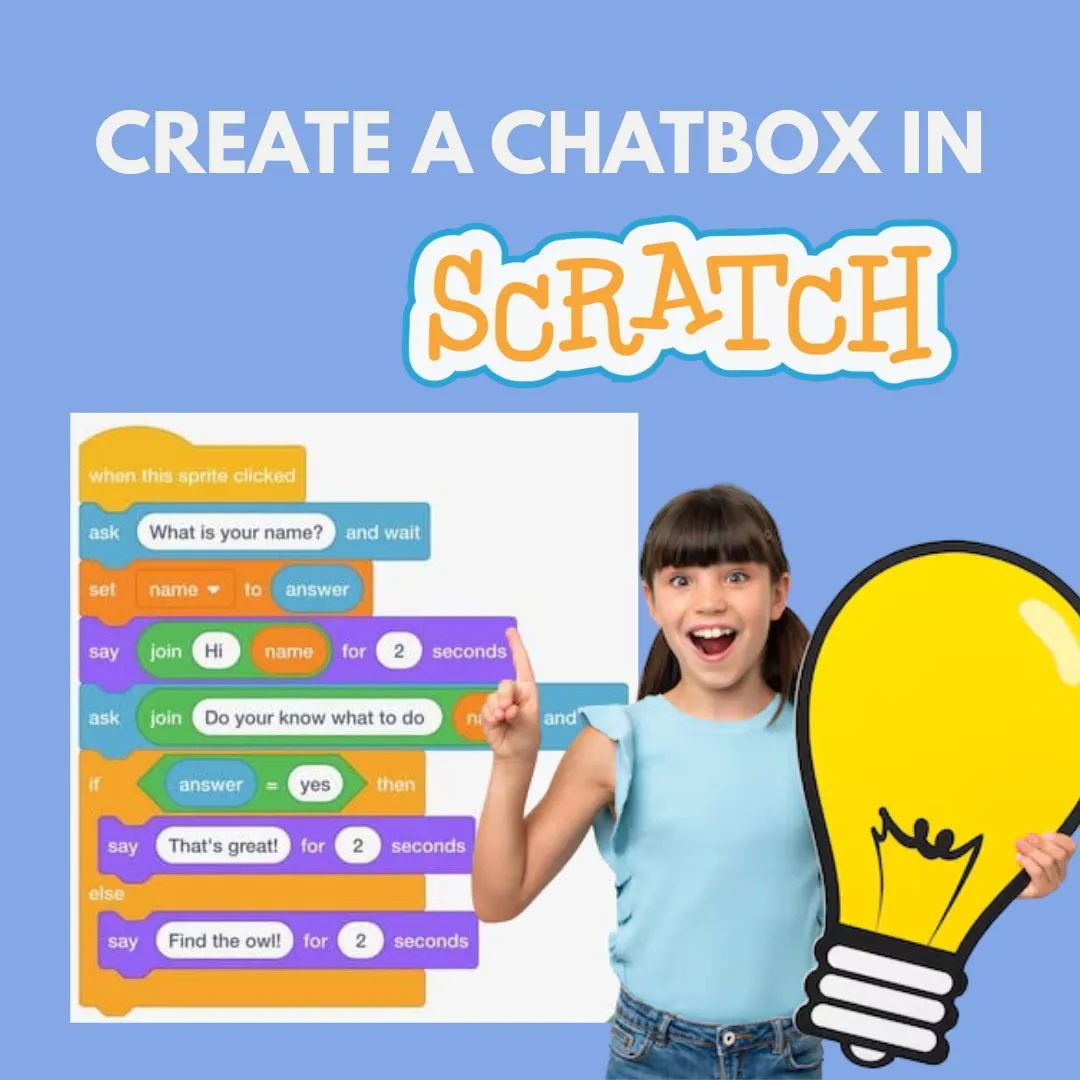
Kids love talking characters, and parents love learning that feels meaningful. What if both could happen at the same time? In this Scratch chatbot guide, children learn how conversations work in games while building logic step by step. This AI style chat box tutorial shows young coders how to create a talking buddy that listens, thinks, and responds using Scratch variables and simple decision making. It feels like artificial intelligence but is built entirely with kid friendly coding blocks.
This project is perfect for beginners who already know a little Scratch programming and want to level up from animations or clicker games into smarter interactions.
What Makes an AI Style Chat Box Tutorial Perfect for Kids
An interactive chatbot is one of the most exciting beginner coding games because it feels alive. Kids type or choose a question and the character responds like a friend. Behind the scenes, the child is learning logic, sequencing, and structured thinking.
In this AI style chat box tutorial, kids discover that chatbots are not magic. They are systems built with rules. When a question matches a condition, a response is triggered. This concept connects beautifully with earlier projects like puzzle games in Scratch and clicker games where logic controls outcomes.
Parents love this project because it builds communication skills along with technical thinking.
Planning Your Chatbot Logic Using an AI Style Chat Box Tutorial
Before coding, kids should plan how their chatbot will behave. This step teaches computational thinking and mirrors real world software design.
In this AI style chat box tutorial, planning includes deciding what questions the chatbot will answer and how it should reply. Kids can start with simple ideas like greetings, favorite colors, or game tips.
A simple planning table looks like this
User Question
hello
how are you
what is scratch
Bot Response
Hi there
I am happy to chat
Scratch is a fun coding platform
This planning step connects nicely with earlier Scratch story projects where dialogue choices shape outcomes.
Creating Variables for Chat Responses in an AI Style Chat Box Tutorial
Variables are the brain of the chatbot. They store what the user types and help the program decide what to say next.
In this AI style chat box tutorial, kids create a variable called question or userInput. When the player types a message, Scratch saves it into the variable.
Steps
Create a variable named userInput
Ask the player a question using ask and wait
Set userInput to answer
This concept reinforces lessons from how to make a clicker game on Scratch where variables track scores and progress.
Building Question Matching Logic in an AI Style Chat Box Tutorial
Now comes the thinking part. The chatbot needs to compare the user input to known questions.
In this tutorial, kids use if and else blocks to check what was typed. This introduces logical branching, a core programming skill.
Example logic
If userInput equals hello
Say Hi there for 2 seconds
Else if userInput equals help
Say I can answer simple questions
Kids quickly see how one question leads to one response. This mirrors puzzle game logic where one move triggers a specific outcome.
Designing Friendly Responses with an AI Style Chat Box Tutorial
A chatbot should feel friendly and fun, not robotic. Kids learn that words matter just as much as code.
In this tutorial, children customize responses with emojis, humor, and personality. They can even change costumes or play sounds when responding.
This creative layer connects to animation projects and character design lessons where expression brings projects to life.
Adding Default Replies Using an AI Style Chat Box Tutorial
What happens if the chatbot does not understand the question? This is a powerful learning moment.
In this tutorial, kids add a default response like
I am still learning. Try asking something else.
This teaches graceful error handling, an important real world coding skill. It also helps kids understand that even smart systems have limits.
Expanding Conversations in an AI Style Chat Box Tutorial
Once the basics work, kids can expand their chatbot into a mini knowledge base.
In this tutorial, they can add topics like game tips, coding facts, or fun jokes. Each new response strengthens logical thinking and confidence.
This step naturally links to interactive story projects where user choices control what happens next.
Turning the Project Into a Game Using an AI Style Chat Box Tutorial
To make things even more exciting, kids can turn the chatbot into a game.
In this tutorial, ideas include
Guessing games where the bot gives hints
Quiz bots that award points
Story bots that unlock scenes
By adding scores or levels, kids reuse concepts from Scratch game physics and level design projects.
Why This AI Style Chat Box Tutorial Builds Real World Thinking
This project goes far beyond fun. Kids learn how modern systems work by breaking them into simple rules.
This AI style chat box tutorial strengthens problem solving, logical sequencing, and communication. It introduces artificial intelligence ideas in a safe, age appropriate way without complex math or advanced coding.
Parents often notice improved confidence as kids proudly show off their talking creations.
Start Building Smarter Projects with Junior Coderz
If your child enjoyed building this chatbot, imagine what they could create with guided support. At Junior Coderz, kids learn Scratch programming through structured yet playful lessons that grow with their skills.
Visit JuniorCoderz to book coding classes, join Scratch workshops, and help your child explore coding for kids the fun way. From interactive stories to puzzle games and AI inspired projects, Junior Coderz turns curiosity into creativity.
Conclusion
Building a chatbot in Scratch is a powerful step in a child’s coding journey. It blends creativity, logic, and communication into one exciting project. Kids see how questions turn into actions and how smart systems are built piece by piece.
By creating talking buddies that respond thoughtfully, young coders gain confidence and curiosity that extend far beyond the screen. With guidance from Junior Coderz, every child can turn simple ideas into smart, interactive creations and begin a lifelong love for learning through code.
FAQs
Is a Scratch chatbot real AI
It is not true artificial intelligence, but it teaches the core ideas behind how AI systems respond to inputs using logic and rules.
What age is best for this project
Kids aged 7 and up can build simple chatbots, especially if they have used Scratch before.
Do kids need typing skills
Basic typing helps, but many chatbots can also use buttons or choices instead of text input.
Can this chatbot be shared online
Yes. Scratch projects can be shared so friends and family can chat with the bot.
What should kids learn before this
Understanding variables, if statements, and simple Scratch animations makes this project easier.